


 by Adam SEO
 Choosing booking software should make your business easier to run.
But if you operate tours, rentals, attractions, charters, transportation, or a mix of experiences, the decision can get complicated fast.
You are not just choosing a calendar. You are choosing the system that will help your team manage reservations, payments, guest communication, capacity, staff workflows, reporting, and day-of operations.
The right platform can save time, reduce mistakes, and help you grow. The wrong one can create more manual work than it solves.
Here is how to choose booking software that actually fits the way your operation works.
Before comparing features, start with the basics: what do you actually sell?
A tour company may need scheduled departures and guest manifests.
A rental business may need inventory control and damage deposits.
An attraction may need timed entry and fast check-in.
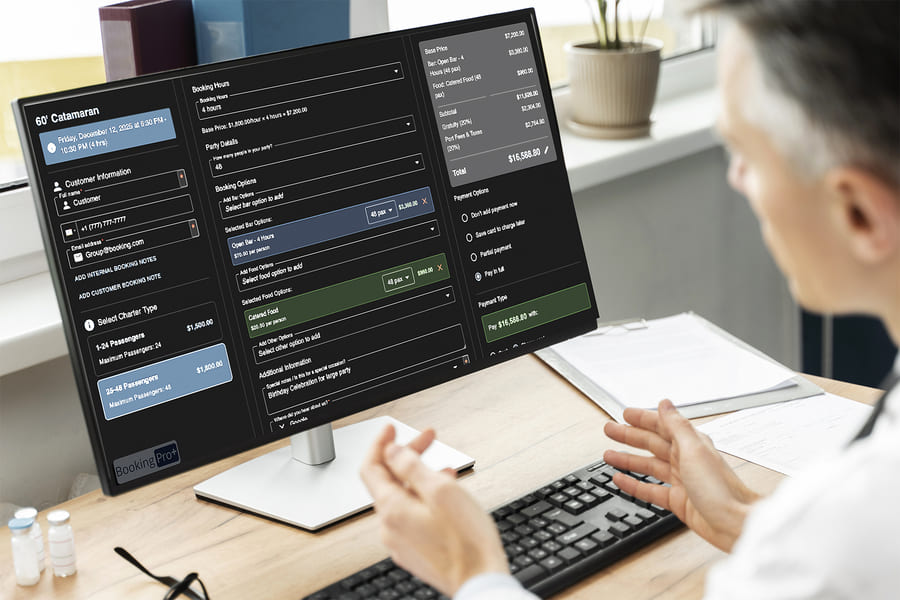
A charter operator may need quoting, deposits, and custom scheduling.
Many businesses need more than one model.
For example, you might offer:
If your business has multiple activity types, avoid software that only handles one workflow well. A platform may look good during a demo, but if it cannot manage your real mix of products, your team will end up using workarounds.
A good booking system should fit your operation instead of forcing your operation to fit the software.
Online checkout matters. Guests should be able to choose an experience, select a date, pay, and receive confirmation without confusion.
But checkout is only the beginning.
For operators, the bigger question is:
What happens after the guest books?
Your software should help you manage:
A simple booking tool may capture the sale, but if your team still needs spreadsheets, paper lists, or separate tools to run the experience, the system is only solving part of the problem.
The best booking software connects the reservation to the operation.
Capacity is one of the most important parts of any tour, rental, or attraction business.
If capacity is wrong, everything else becomes risky.
For tours, you may need to limit guests per departure.
For rentals, you may need to track available equipment.
For attractions, you may need to control timed entry.
For charters, you may need to reserve a vessel, vehicle, guide, or resource.
Look for software that can manage:
If you run a multi-activity operation, resource management becomes even more important.
For example, if the same vehicle is used for a public tour and a private charter, your system should prevent double-booking automatically.
If the same rental inventory supports both guided tours and standalone rentals, your system should keep availability accurate in real time.
Your booking software should be easy for your team, but it also needs to be easy for guests.
A confusing booking flow can cost you reservations.
When reviewing platforms, test the checkout experience like a customer.
Ask:
Many guests book tours and activities from their phones while traveling. If the booking process is slow, hard to read, or frustrating on mobile, you may lose customers who were ready to buy.
Strong booking software should reduce friction, not create it.
Payments are not one-size-fits-all.
Some operators collect full payment upfront. Others rely on deposits, remaining balances, invoices, private quotes, or group payments.
Your booking software should support the payment workflows your business actually uses.
Look for features like:
This is especially important for rentals, charters, private tours, and higher-ticket experiences.
If your system cannot handle deposits or balances cleanly, your team may end up chasing payments manually.
That creates more admin work and increases the chance of missed revenue.
For many operators, day-of operations are where the software either proves itself or falls apart.
A tour manifest is the guest list your staff uses to run the experience. It may include names, group sizes, contact details, notes, payment status, add-ons, waiver status, and check-in status.
If your business depends on accurate headcounts, staff coordination, or safety procedures, built-in manifests matter.
Look for booking software that supports:
For attractions, check-in speed helps reduce lines.
For boat tours and transportation, manifests support safety and accountability.
For adventure tours, staff need accurate guest details before the experience begins.
If your platform stops at checkout, your team may still need to build the operational workflow manually.
Not every reservation starts with a standard checkout page.
Many operators sell:
These often require a quote before payment.
If private or custom bookings are part of your revenue, look for booking software that supports a quote-to-booking workflow.
A strong quoting process should allow you to:
Without quoting tools, teams often rely on email threads, PDFs, spreadsheets, and manual payment links.
That may work for a few inquiries, but it becomes hard to manage as volume grows.
Booking software should help you understand your business, not just record transactions.
Basic reports may show total bookings and revenue. That is helpful, but growing operators need more detail.
Look for reporting that can help you track:
The goal is to make better decisions.
Which products should you promote?
Which time slots are underperforming?
Which channels bring your best customers?
Which tours look busy but are not very profitable?
The right reporting helps you stop guessing.
Your booking system holds some of your most valuable data: your customers.
That data can support better communication, repeat bookings, reviews, and promotions.
Look for features that help you manage:
Clear communication reduces guest questions and improves the overall experience.
For example, a strong confirmation email can tell guests where to go, when to arrive, what to bring, how to check in, and what to do if plans change.
That saves your staff time and helps guests feel prepared.
Some operators want one platform to do as much as possible. Others need their booking software to connect with accounting tools, websites, marketing systems, partner channels, or custom applications.
Before choosing a platform, think about what needs to connect.
Ask:
Integrations can be useful, but they also create responsibility. If your operation depends on an integration, make sure you understand how reliable it is and who maintains it.
The best platform is not always the one with the longest integration list. It is the one that supports the workflows your business depends on.
Even great software can fail if onboarding is weak.
When choosing booking software, ask how the provider helps you get started.
Look for support with:
Support matters most during busy periods, weekends, holidays, and unexpected issues.
Tour, rental, and attraction businesses often operate outside normal office hours. If something breaks before a departure or during peak season, fast support matters.
Do not treat support as an afterthought.
It is part of the product.
Feature lists can be misleading.
Two platforms may both claim to offer “reporting,” “payments,” “check-in,” or “integrations,” but the quality of those features can be very different.
During demos, ask the provider to show real workflows.
For example:
This will show you whether the platform can actually support your operation.
A feature only matters if your team can use it easily.
When choosing booking software, avoid these mistakes:
Low monthly cost can become expensive if your team spends hours on manual work.
If you run tours, rentals, and attractions, make sure the platform can support all of them.
A good checkout does not guarantee a smooth experience. Manifests, check-in, and staff access matter.
If you cannot see what is working, you cannot improve it.
Choose a platform that can support where your business is going, not just where it is today.
Before committing to booking software, ask:
These questions will help you compare platforms based on operational fit, not just marketing claims.
Booking Pro+ is built for operators who need more than a basic booking calendar.
For businesses managing tours, rentals, attractions, transportation, charters, or multiple experience types, the value comes from connecting reservations to the rest of the operation.
That means one workflow can support:
Instead of piecing together separate tools, operators can manage more of the business from one platform.
That kind of connected system is especially useful for teams that want fewer workarounds, cleaner reporting, and smoother day-of operations.
The best booking software is not always the flashiest platform or the one with the longest feature list.
It is the one that fits your business model, supports your team, simplifies guest reservations, and gives you better control over daily operations.
If you run tours, rentals, attractions, or a mix of experiences, look for software that connects the full journey:
From online booking to payment.
From manifest to check-in.
From reporting to smarter decisions.
From first-time guest to repeat customer.
When those pieces work together, your business becomes easier to manage and easier to grow.
To see how Booking Pro+ can support your tours, rentals, attractions, and day-of operations in one connected platform, book a demo and walk through your real workflow with the team.